










My Account
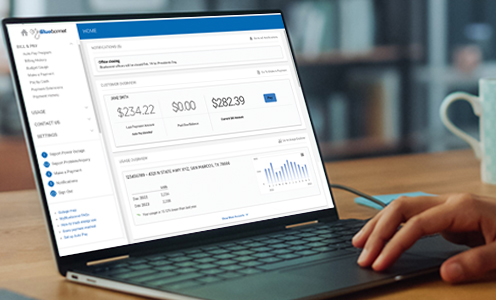
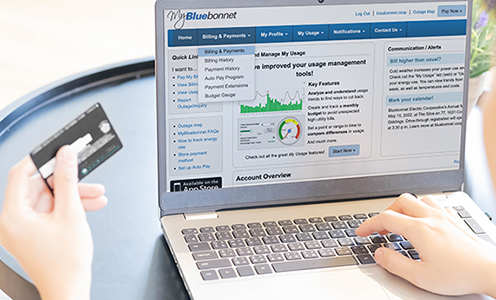
MyBluebonnet is your online account where you can pay a bill, see current and previous months’ bills, set up automatic payments, track your energy use and much more — anytime, anywhere. You can access it online by clicking Log in on the top of any page or through the free MyBluebonnet mobile app.
To get started, you’ll need your Bluebonnet account number found on your bill, the last name or business name on the account, and the email address you want to use. Your email address will become your username.
Step by step guide for desktop browsers:
- Click here to register or select "Don't have an account? Register now" on the login screen.
- Enter your account number, the last name or name of your business that is on the account, the email address associated with your account, and click "Continue."
- Next, you’ll select a security question: either your birth month and day (MMDD) or the last four digits of your Social Security number or Federal Tax ID (for businesses).
- Enter the answer, click the box to confirm that you are not a robot, read the terms and conditions, and click the box at the bottom to accept them.
- Check for a new email from Bluebonnet to verify your email address. In that email, click on the "Update Password" link.
- You’ll go to a page to create and confirm a password, then click "Save." Your username will be the email you entered during the signup process.
Step by step guide on mobile:
- Download the MyBluebonnet app on the App Store (for iPhone and Apple devices) or Google Play (for Android).
- Open the app and tap "Don’t have an account? Register now."
- Enter your account number, last name or business name, and the email on the account, then tap Continue.
- Choose a security question, enter your answer, and tap “Register”.
- Check your email for a verification message and follow the instructions to set your password.
- Once completed, you’ll see a confirmation screen that your account is created.
Once your account is set up, you can log in to your MyBluebonnet account by clicking "Log in" at the top of any bluebonnet.coop webpage or download the free MyBluebonnet mobile app on the App Store (for iPhone and Apple devices) or Google Play (for Android).
Use your email address and the password you created during registration.
To use the features in your MyBluebonnet account, start by logging in at bluebonnet.coop or through the MyBluebonnet mobile app on the App Store (iPhone) or Google Play (Android).
On desktop: After logging in at bluebonnet.coop, use the menu on the left side of the screen to view your bill, make payments, set up Auto Pay, report outages, update your account information, and more.
On the mobile app: Tap the icons in the bottom menu to access the same features, including usage history, billing, and service requests.
Need help? Watch these short how-to videos to learn more: MyBluebonnet features video tutorial »
Watch these short how-to videos to learn more: MyBluebonnet features video tutorial »
Your account number is located in the top-left corner of your Bluebonnet bill. To view your bill or account number, log in to your MyBluebonnet account online or in the mobile app, select “Bill & Pay” from the menu, then choose “Billing History”. You will see a list of your accounts along with their numbers.
If you’ve already updated your username to your email address, click here to recover your password ».
Follow these steps under Reset Password:
- Enter your account number, the last name or business name on the account, and the email address tied to your MyBluebonnet account.
- Click “Continue.”
- Answer a security question (either your billing ZIP code or your most recent bill amount).
- Enter and confirm your new password.
- Your browser may have saved your password. Make sure to clear your webpage cache for previous passwords and refresh your browser.
Still need help? Call member services at 800-842-7708 from 8 a.m. to 5 p.m., Monday through Friday.
Your username will be the email address used to create the account. If you can’t remember the email address used, click here, select “Can't access your account,” and then select the "Recover Registered Email" tab.
You will be asked to enter your account number and last name (or business name). Click “Continue.” Then, answer the security question (either the amount of your most recent bill or your ZIP code), and click “Submit” again. Your login screen will appear with your email address populated in the username field.
Make this change by logging in at bluebonnet.coop, click on the "Settings” tab, “Security” then update password or email.
To add an authorized user to your account, please call member services at 800-842-7708 from 8 a.m. to 5 p.m. Monday through Friday.
To add additional email addresses or phone numbers for notifications, log in to your account and go to “Settings”, then select “Contact Methods” to add the new contact information. After that, choose “Manage Notifications” to customize alerts such as payment reminders and usage notifications.
How do I monitor my electricity use?
After logging in to your MyBluebonnet account, go to “Usage.” The Usage Explorer tool provides an easy-to-read look at your past and current electricity use. You can also use the Usage Comparison tool to view two billing periods side by side and the Average Usage tool to see your typical energy use over time.
Once you select your account, you can view your electricity use by month, day, or hour. You can also choose a date range, switch between usage and cost, and see a line showing what the outdoor temperature was during that time. These tools help you better understand how and when you use electricity, so you can make informed decisions to manage your bill.
Watch the video tutorial »
Set up or change your energy use notifications:
Log in to MyBluebonnet at bluebonnet.coop. Click “Settings,” then “Manage Notifications.” Find “Usage Alert,” click “Options,” and follow the prompts to set your preferences.
In the MyBluebonnet app, tap “More,” then “Settings” and select “Manage Notifications.” Choose “Usage Alert,” tap “Add New Alert,” select the account, set your usage limit, then click “Continue” in the top right. Toggle how you’d like to be notified and tap “Save.”
Bluebonnet Electric Cooperative may send reminders by mail, email or make courtesy phone calls about upcoming or past-due payments. However, we will never demand immediate payment over the phone. Do not share your personal or account information or make a payment to anyone claiming to be from Bluebonnet in a threatening or urgent tone. If you receive a suspicious call, write down any details about the caller and the number they called from. Then, report it to law enforcement and a Bluebonnet member service representative at 800-842-7708 between 8 a.m. and 5 p.m. Monday through Friday.
Two-factor authentication is a security method that requires two forms of identification to access your account, adding an extra layer of protection beyond just a password.
All Bluebonnet employees are required to wear Bluebonnet uniform shirts and hard hats, carry Bluebonnet IDs and have the Bluebonnet logo on their vehicles. Typically, Bluebonnet vehicles are white. If you’re unsure, you can call member services to verify their identity.
Contractors' vehicles vary in color and will display both their company logo and a Bluebonnet contractor sign. All Bluebonnet contractors are required to wear uniforms with their company logo.
If someone claims to be with Bluebonnet but isn’t in a marked vehicle or uniform, or if the situation feels suspicious, do not engage. Call Bluebonnet at 800-842-7708 8 a.m. and 5 p.m. Monday through Friday or contact local law enforcement.
If no one is home, Bluebonnet crews will leave a gate or door hanger with details about the service, when it will happen and a number to call for questions.
For planned work and maintenance, Bluebonnet will send you a text message or call in advance before accessing your property.
During severe weather or outages, Bluebonnet and its contractors may need to access your property to restore power. In these cases, advance notice may not be possible. All personnel will be clearly identified and wear marked clothing.
If you suspect energy theft or tampering with electric service, contact Bluebonnet immediately. Call a member service representative at 800-842-7708 8 a.m. and 5 p.m. Monday through Friday.
Billing & Payments
To pay your bill at bluebonnet.coop, log in to MyBluebonnet. On your home screen, click "Go To Make A Payment" or the "Pay" button in the Customer Overview box. Select the account to pay, review or change the amount you want to pay, and click "Continue." Confirm the information, then click "Continue," select a payment method, and follow the prompts to process your payment.
One-time payments can be made without logging into an online account by clicking "Quick Pay" from the top of any bluebonnet.coop page. You will need your Bluebonnet account number and the last name on the account or your business name to make this type of payment. If you have multiple accounts, select the account you would like to pay in the blue search bar. Confirm the account, click "Continue," and follow the steps to input your payment information.
You can mail your payment along with your billing stub to:
Bluebonnet Electric Cooperative
P.O. Box 240
Giddings, TX 78942
Visit one of our member service centers to make a payment. View locations ».
Does Bluebonnet accept third-party payments through my bank or Western Union? Bluebonnet accepts payments through Western Union and MoneyGram. A $1.50 processing fee will be charged by the vendor.
You may also be able to make payments through your bank's bill pay service. However, third-party payments do not post instantly to your Bluebonnet account and may cause delays. If a payment is not received by the due date, a late fee may apply.
The check-by-phone payment option requires a PIN to ensure the security of your bank account information. You will create a four-digit PIN the first time you use this payment method, and you’ll need to enter it each time you use the feature.
If you need to create or update your PIN, simply press 5 when using the check-by-phone option.
With Bluebonnet’s Auto Pay Program, your bill will be automatically paid each month from your bank account or credit/debit card. You’ll receive an email each month with the payment amount and date, so you know what to expect.
You can enroll anytime or cancel anytime online, thorugh the MyBluebonnet app or with the automated phone system. Before setting up Auto Pay your balance must be paid, and you’ll need your payment details (bank account or credit/debit card).
From a desktop browser:
- Log in to MyBluebonnet at bluebonnet.coop
- Click the “Bill & Pay” tab and select “Auto Pay Program”
- Review and accept the terms
- Click “Add New” to enter a new card or bank account
- Enter your payment information and select "Continue"
- A confirmation screen will appear once you’ve successfully enrolled in Auto Pay
- Log in to the MyBluebonnet app
- Tap “Bill & Pay” and select “Auto Pay Program”
- Review and accept the terms
- Tap the plus (+) icon to add new card or bank account
- Enter your payment information and tap “Continue”
- A confirmation screen will confirm successful enrollment in Auto Pay
Through Bluebonnet’s automated phone system:
- Call 800-842-7708
- Select option 2 for payments
- Then select option 3 for Auto Pay
- Enter your Bluebonnet account number followed by the # key, and follow the prompts
Once enrolled, look for the "Auto Pay" message on your next bill to confirm your enrollment.
Still need help? Call member services at 800-842-7708 from 8 a.m. to 5 p.m. Monday through Friday.
Your first automatic payment will be processed during your next billing cycle after enrollment. You will receive an email each month with the total amount due and the date your payment will be drafted, so you know what to expect.
To confirm your enrollment, check your next bill for the “Auto Pay” wording in the blue box at the top.
If your automatic payment is set up using a credit card, you will receive a "Auto Pay Declined" email notification on the evening of the due date.
If your payment is set up through ACH (bank draft) and the payment is returned due to insufficient funds, a "Non-Sufficient Funds" letter will be mailed to you the day after the payment is returned.
You can also log in to your MyBluebonnet account at any time to check your current balance and payment status.
To schedule a payment through MyBluebonnet, follow these steps:
-
Log in to MyBluebonnet at bluebonnet.coop
-
Select “Bill & Pay”, then “Make a Payment”
-
Select the account(s) you want to pay. You can choose to pay multiple accounts in one transaction by checking the boxes next to each account number.
-
Adjust the payment amount as needed. You can make a partial or overpayment.
-
Click the “Pay Now” button to view the Payment Summary.
-
On the Payment Summary screen, confirm the amount(s) and account(s) you’re paying, then select “Cancel Payment” or “Continue”.
-
Choose your payment method and payment date. You can schedule a payment up to 20 days in advance.
-
If you select a payment date after the due date, a message will appear:
"The Payment date selected is past the due date. Services may be subject to late fees or a disconnect of service if the payment is received after the due date."
-
After clicking Continue, you’ll receive a confirmation message that your payment has been scheduled.
To stop Auto Pay, log in to your account at bluebonnet.coop or in the MyBluebonnet App, click on “Bill & Pay,” then “Auto Pay Program.” Accept the terms and conditions, then select “Disable Auto Pay”.
To cancel through our automated phone system, call 800-842-7708. Select Option 2 for payments, then Option 3 for Auto Pay. You’ll need your account number to complete cancelation.
To cancel a scheduled payment, log in online or through the app. Go to “Bill & Pay” and select “Payment History.” Find the scheduled payment you’d like to cancel and follow the instructions to remove it.
Bluebonnet provides members with 16 days to pay their bill from the date it is issued and sent.
A payment is considered late if it is received after 5 p.m. the day after your due date.
If payment is made before 5 p.m. the day after your bill is due, it is not considered late and no late fee will apply.
Payments received after that time are subject to a late fee of $5 per meter or 5% of the bill, whichever is greater.
Bluebonnet will send you a notice when a payment is not received by the due date. Once the notice is issued, you have 10 days to pay your electric bill or your service will be at risk for disconnectioin for nonpayment.
If you need more time to pay, you can request a payment arrangement.
Learn more about our past due policy or financial assistance »
When accounts are past due, we send three reminder disconnect notices via mail, email and phone calls within a two-week period before service is disconnected for nonpayment. If you believe you did not receive these notices, please call member services at 800-842-7708 from 8 a.m. to 5 p.m. Monday through Friday to verify your contact information is up to date.
Bluebonnet will send you a notice when a payment is not received by the due date. Once the notice is issued, you have 10 days to pay your electric bill or your service will be at risk for disconnectioin for nonpayment.
You can stop the disconnection by paying your full past due balance within the 10-day period.
If your electric service is disconnected for nonpayment, you must pay:
- The total past-due balance
- A $110 service interruption fee
- A possible $300 deposit, if applicable
You can make these payments and have your service reconnected 24/7. Once payment is made, service can typically be restored within 15 minutes to one hour.
Please note: If crews need to be dispatched after hours to restore your service, an additional trip charge of $125 may apply.
- To pay your bill at bluebonnet.coop, log in to MyBluebonne and click "Go To Make A Payment" or the "Pay" button.
- One-time payments can be made without logging in by clicking "Quick Pay" from the top of any bluebonnet.coop page.
- To pay your bill over the phone, call 800-842-7708 and select Option 2 for payments.
If your electric service is disconnected for non-payment, you must pay the full past-due balance and a $110 service interruption fee. For the first disconnect within 12 months, no deposit is charged, but you’ll receive a notice warning that a second disconnect may result in a $300 deposit.
If you're disconnected a second time within that 12-month period, you’ll pay the past-due balance and $110 fee, plus a $300 deposit on your next bill — unless you already have a deposit that covers at least two months of your electricity use.
We understand at certain times a member may need to make a payment after the due date. In those situations, you can request to defer your payment to avoid a disconnection. If your account is eligible, we can offer you up to seven additional days past your scheduled service interruption date.
You can request a payment extension in one of three ways:
- Log in to your MyBluebonnet account to request a payment extension »
- Call in to our automated system and choose Option 2 for the bill pay menu, then choose Option 2 to request a payment extension.
- Request an extension with a member service representative at 800-842-7708 from 8 a.m. to 5 p.m. Monday through Friday.
To be eligible for a payment arrangement, you must request it before the last day to pay on your account. Eligibility for a payment extension depends on your payment history and account status. Members with repeated missed payments or a past-due balance may not qualify. You must request an extension before your last day to pay.
If approved, you’ll receive seven extra days to make your payment.
If you are unable to pay your bill or need to talk about payment extension options, please contact member services at 800-842-7708 from 8 a.m. to 5 p.m. Monday through Friday. For a list of assistance providers and agencies within Bluebonnet's service area, visit bluebonnet.coop/assistance.
In addition, a state Comprehensive Energy Assistance Program provider may be able to help. A complete list of providers is available at the Texas Department of Housing and Community Affairs or call 877-541-7905 and get connected with your local CEAP administrator.
You can check your account balance and pay your electric bill.
No. Accounts can only be accessed by entering your Bluebonnet account number or scanning the barcode on the back of your bill. If you don’t know your account number, it can be found on the top left corner of your bill. To view your bill or account number, log in to your MyBluebonnet account online or in the mobile app, select “Bill & Pay” from the menu, then choose “Billing History”. You will see a list of your accounts along with their numbers.
Yes, you can make a payment at the kiosk to restore your service. Once your past due balance as well as $110 service interruption fee is processed, your power will be restored.
The kiosk accepts credit and debit cards, cash and checks. It does not accept coins or dispense change.
Yes, the kiosk will provide a printed receipt upon completion of your transaction.
The kiosk does not provide change. Any payments made exceeding the member’s balance will be credited to the account.
Yes, you can pay more than your current balance. Any excess payment will be credited to your account and applied to future bills.
Credits usually take up to one minute to show on your account. To see your current balance after a credit is applied, please start a new session or log in to your MyBluebonnet account online or through the mobile app.
The kiosk accepts payments from $5 to $2,500 for cash, card and check.
Yes, they are available in Spanish. You can select your language from an icon at the bottom of the screen.
Please use another payment method or ask a member service representative for assistance.
Credits usually take up to one minute to show on your account. To see your current balance after a credit is applied, please start a new session or log in to your MyBluebonnet account online or through the mobile app.
If you didn’t receive your bill by mail, please check the following:
- Ensure you have an active mailbox at the billing address listed on your account and that it is registered with your post office.
- Verify that you are checking the mail at the correct billing address (not the service address).
- If you’ve moved, make sure you’ve notified your post office of your address change.
If these steps don’t resolve the issue, please a member service representative at 800-842-7708 from 8 a.m. to 5 p.m. Monday through Friday.
You can view or print PDF copies of your bill by logging into your My Bluebonnet account online or on the app and choosing 'Billing History' under the “Bill & Pay” menu.
Enjoy the benefits of paperless billing with 24/7 online access to your account and statements, email reminders when your bill is ready and due and the elimination of paper clutter.
To enroll in paperless billing on a computer, log in at bluebonnet.coop. Click on "Settings," then select “Paperless Billing.” Slide the switch to the right, and when prompted, tap "Yes" to confirm your selection.
To enroll in paperless billing from a smartphone or tablet, open the MyBluebonnet app and tap “More” at the bottom of the screen. Next, tap “Settings,” then select “Paperless Billing.” Slide the switch to the right, and when prompted, tap “Yes” to confirm.
Yes, any member with an email on file with Bluebonnet now automatically receives an email with bill information. If you are not signed up for paperless billing, you will still receive a paper bill in the mail, usually a few days after you receive the email.
You can view or print PDF copies of your bill by logging into your My Bluebonnet account online or on the app and choosing 'Billing History' under the “Bill & Pay” menu.
Bluebonnet provides a clear breakdown of both residential and commercial sample bills to make it easy to review charges and account details.
Log into MyBluebonnet, go to "Bill & Pay," and select "Billing History." You’ll see a list of your bills from the past 12 months, including the bill date and total amount. To view or download a copy of any bill, click the "View Bill" link.
If you need a full consumption history or an official statement, please call a member service representative at 800-842-7708 from 8 a.m. to 5 p.m. Monday through Friday.
SteadyPay is a billing option for members to pay a consistent amount on their bill over a period of time. The amount is calculated by a member’s average electricity use over the last 12 months and allows the member to pay the same amount for six months. Twice a year — in April and October — bill amounts are recalculated based on the member’s last 12 months of electricity use and the new amount will be reflected on May and November billing statements, respectively.
SteadyPay is a billing option for members to pay a consistent amount on their bill over a period of time. The amount is calculated by a member’s average electricity use over the last 12 months and allows the member to pay the same amount for six months. Twice a year — in April and October — bill amounts are recalculated based on the member’s last 12 months of electricity use and the new amount will be reflected on May and November billing statements.
Enroll in SteadyPay through MyBluebonnet by logging into your online account. Select "Contact Us" then "Submit a Request." Choose "Enroll in SteadyPay" from the drop-down menu.
Once a Bluebonnet member has received service for a minimum of six consecutive months, they are eligible to enroll in SteadyPay. The member’s SteadyPay amount will calculated based on the member’s usage of the six months prior. After six months of being enrolled in the SteadyPay program, the member’s account will recalculate the SteadyPay amount to reflect the prior 12 months of electricity use.
Once enrolled, the SteadyPay amount will go into effect on your next month’s bill. If you have a previous balance, it will be due on the date on your current statement.
If you pay more than your SteadyPay amount, additional funds will be applied to an outstanding balance, if consuming more electricity than budgeted in the consistent amount. If there is no account balance, a credit will be applied to your account. Any credits and/or debits will be factored into the recalculation amount. We will divide the credit or balance evenly into payments over the next 12 months.
If you don’t pay your SteadyPay amount in full, your electrical service is subject to being disconnected for nonpayment. Your account may also be removed from the SteadyPay billing program.
Payments made before a bill is available will be added as a credit to the account and will not apply to your upcoming statement.
If you’re enrolled in SteadyPay at your current address and you’re moving to a new home in Bluebonnet’s area, you can remain on SteadyPay. To help ensure your SteadyPay bill is as accurate as possible, you can request a recalculation of your amount to reflect your electricity use history at the new location because electricity use can vary by size and age of homes.
Your new location will be added to your monthly bill, but the amount you pay each month will not increase. You can speak to a member service representative and ask them to adjust your SteadyPay amount to include both locations.
Once an account is removed from the SteadyPay billing program due to nonpayment, all outstanding balances, including the difference between actual electricity used and SteadyPay amount, must be paid by your next due date.
Yes, you can re-enroll in the program after 12 consecutive months of on-time payments. If you’re disconnected for nonpayment or your payment is returned, your eligibility period will restart.
Visit bluebonnet.coop/rates to see a breakdown of Bluebonnet’s current electric rates.
When members sign up for the Green Energy Rate, Bluebonnet will purchase the amount of energy they consume each month from a renewable source such as wind power.
The Green Energy Rate costs a half-cent ($0.005) more per kilowatt-hour (kWh) than the regular rate and is applied to your entire monthly metered energy use. There’s no minimum participation period, so you can opt in or out at any time. Call member services from 8 a.m. to 5 p.m. Monday through Friday for questions or to enroll.
PCRF is power cost recovery factor. Bluebonnet is a distribution cooperative, which means it purchases power wholesale from another entity, then distributes that power to its members. Bluebonnet buys the majority of its power from the Lower Colorado River Authority. The PCRF is the part of your electric bill that directly reflects the fluctuating cost of generating power, primarily due to fluctuations in fuel costs like natural gas.
Part of Bluebonnet's rate is used to recover a set amount of its power cost or electric generation. As the cost of purchasing power rises above that set amount, Bluebonnet adjusts the PCRF in order to recover the additional cost paid to its wholesale electric providers. So, our rate doesn't change — the PCRF does.
It's much like the cost of your car — your monthly car payment stays the same, but as gasoline prices at the pump change, so does the cost to use your car.
The main advantage to having a PCRF that's responsive to fuel prices is that whenever fuel costs fall, Bluebonnet members aren't stuck with a higher PCRF because it falls, too.
There are two components to your electric rate: the cost to purchase wholesale power and the cost to distribute power. The distribution rate rarely changes; it typically remains the same for several years. Bluebonnet has not increased its distribution rate since 2017.
The PCRF is the variable portion of wholesale power costs and changes as needed based on factors in the wholesale market, including, but not limited to, increases or decreases in the cost of natural gas, which is the fuel that generates the majority of electricity in Texas. Bluebonnet monitors the wholesale power market on a daily, weekly, monthly and yearly basis and adjusts the PCRF as needed based on market conditions.
A payment is considered late if it is received after 5 p.m. the day after your due date.
If payment is made before 5 p.m. the day after your bill is due, it is not considered late and no late fee will apply.
Payments received after that time are subject to a late fee of $5 per meter or 5% of the bill, whichever is greater.
If your electric service is disconnected for nonpayment, you must pay the full amount past due and a service interruption fee of $110. This fee covers the cost of staff time, trips to the meter (if required), technology used to remotely disconnect and reconnect service, and administrative processing related to service interruptions.
The disconnect trip fee is $55 when when electric service needs to be temporarily disconnected for maintenance or for work being done on the member's service side of the electric meter, such as by a contractor, renewable energy installer or electrician.
The returned check fee is $30. This fee is charged when a payment is declined due to insufficient funds or other issues and is a pass-through charge directly from the bank to cover the cost of the returned transaction.
If electricity is not currently active at the location where you’re starting service, you’ll need to pay a $55 activation fee plus any applicable deposits based on your credit or payment history. If you're coordinating a move-in and the current resident or property owner is disconnecting their service, you can avoid the activation fee by starting your service on the same day their service ends. This ensures there is no interruption in electric service at the location.
Yes, members can have one meter test at no charge every four years. A $55 fee will be charged if the member requests an additional meter test within the four-year timeframe. To request a meter test, please a member service representative at 800-842-7708 from 8 a.m. to 5 p.m. Monday through Friday.
Yes, you can request a switch for your security light for $55. To request a switch, please a member service representative at 800-842-7708 from 8 a.m. to 5 p.m. Monday through Friday.
Yes, Bluebonnet will install a meter loop. There is a $125 installation fee, which covers the labor and mileage required for Bluebonnet crews to hang the loop at your location. This fee applies whether the loop is provided by the member or by Bluebonnet and does not include the cost of the meter loop itself.
Yes, there is a restaking fee of $125 if Bluebonnet needs to revisit, replan or adjust the original electric service design.
A service fee is charged when you request a Bluebonnet technician to visit your location and it is confirmed that your meter is working properly. This fee covers the cost of the visit when no problems are found with Bluebonnet’s equipment.
If the visit occurs during regular business hours, the fee is $55. To make a service request during business hours, please call a member service representative at 800-842-7708, Monday through Friday, from 8 a.m. to 5 p.m.
For visits requested outside of business hours, the fee is $125. You can report your issue online at bluebonnet.coop/report-outage » or call the 24/7 outage line at 800-949-4414.
The fee for converting a temporary to permanent meter loop is $125. To request this service, please a member service representative at 800-842-7708 from 8 a.m. to 5 p.m. Monday through Friday.
The fee is $350 for the first offense, $500 for the second offense and $800 for the third offense. In addition to these fees, you will also be responsible for payment of any estimated power usage during this time. Charges may be assessed accordingly.
A deposit may be required depending on your credit history or account status.
- A soft credit check through Equifax will be run during the application process to determine if a deposit is required.
- If a deposit is required, it will be $225 per residential meter.
- Applicants without a Social Security Number must visit a member service center in person with a valid photo ID and will be required to pay the $225 deposit at that time.
- Returning or existing members will have their deposit determined based on their most recent 12 months of payment history.
- If you do not have 12 months of payment history or have been inactive for more than 2 years, a soft credit check will be used to determine if the $225 residential deposit will be required.
Deposit amounts vary based on the type of commercial service. Single-phase commercial accounts require a $250 deposit, while three-phase commercial accounts require a $900 deposit.
For large power accounts, the deposit is calculated as twice the average consumption of a similar business at the same location. To receive a quote for a large power deposit, please call member services from 8 a.m. to 5 p.m. Monday through Friday.
Outages
Four steps to take during an outage
- Check the electrical panel for a tripped circuit breaker or blown fuse.
- Verify if your neighbor’s power is also out.
- Use the outage map to locate outages. The map updates every 5 minutes.
- Report the outage to Bluebonnet Electric Cooperative via text (OUT to 44141), online at bluebonnet.coop, the MyBluebonnet app or by calling 800-949-4414.
Ways to report an Outage
- Call the automated outage hotline at 800-949-4414.
- Use Bluebonnet’s Outage Alerts text service. Save 44141 in your phone and text:
- OUT to report an outage
- STATUS for an update
- HELP for more info
- STOP to opt-out
- BBOUTAGE to re-enroll
- Report an outage via your online account.
- Use the MyBluebonnet mobile app to report an outage.
Update your contact information
To help restore power quickly, make sure your contact info is up to date. You can update it in three ways:
- Log in at bluebonnet.coop, go to the Notifications tab, click Manage Contacts and Add Phone Contact.
- In the MyBluebonnet mobile app, go to More, Settings, then Contact Methods.
- Call 800-842-7708 during business hours (8 a.m. - 5 p.m. Monday - Friday) to speak with a representative or email memberservices@bluebonnet.coop.
You can report your outage one of four ways:
- Text OUT to 44141
- Visit bluebonnet.coop/outages
- Use the MyBluebonnet app
- Call 800-949-4414 to report via the automated outage line
When you call or text from the phone number tied to your account, we can more quickly locate the area where power is out and restore your power.
That means it is important that you keep your account information updated with your most current phone number.
Every outage notification sets in motion a coordinated process that ends only when your power is restored. Once the outage report is received Bluebonnet crews go to work to get your power on as quickly and safely as possible. See the steps here »
As power is being restored, you may see a neighbor's lights come back on while yours is still out. It’s possible that different parts of your neighborhood are served by different sections of power lines or equipment is damaged at your home or business. If you have not yet reported your outage, call 800-949-4414. If you are enrolled in outage texting alerts, text OUT to 44141.
Click to view the outage map. You can also click the box labeled "View the outage map" on Bluebonnet’s homepage or the “Outage Map” icon on your mobile app. Once there, the map will automatically display outage information across our service area.
When the map opens, start by reviewing the legend in the top right corner, which explains the meaning of all icons and colors. For example, a red hexagon indicates a verified outage.
In the bottom left corner, you will find a summary of current outages, weather conditions affecting the area and a 48-hour history of outages and weather events.
The map shows hexagon icons representing outages, color-coded by type. Hover over any icon to see details such as the number of affected members, the outage start time and whether a crew has been assigned.
You can use the outage map to see planned, predicted, current and restored outages. Current outages are displayed as red hexagons. To locate an outage in your area, scroll through the map and hover over or click on any red icon. This will show detailed information including when the outage started, how many members are affected and when a crew was assigned.
The map updates every five minutes to provide the most current information.
If you are enrolled in Outage Alerts, you can also text STATUS to 44141 to receive outage updates via text message.
You can check the status of an outage using Bluebonnet’s outage map. Outages are marked with red hexagons, and when a crew has been assigned, the icon will show a serviceman. The map updates every five minutes with the latest information.
- Check your breaker panel: Go to your outside breaker panel, flip the main breaker off, then back on. If you are unsure how to do this, or if you feel uncomfortable, please contact a licensed electrician.
- If power is still not restored, please report the outage using one of the following methods:
- Text OUT to 44141
- Report online at bluebonnet.coop/report-outage
- Use the MyBluebonnet mobile app
- Call 800-949-4414
Once we receive your report, we will investigate the issue and work to restore your power as quickly and safely as possible.
If you have a cell phone number on file with Bluebonnet, you’re automatically enrolled in outage alerts text service.
If you’ve previously opted out, you can re-entroll by texting BBOUTAGE to 44141.
Tip: Save 44141 in your contacts as “Bluebonnet Outages” for easy access.
You’ll receive a text alert from Bluebonnet if your account is associated with an outage. This is based on the phone number tied to your account, so it’s important to keep your contact info up to date.
Bluebonnet will send a follow-up text to notify you when your power has been restored.
You’ll receive updates:
- When an outage is reported in your area
- When you request a status update by texting STATUS
- When your power is restored
- Occasionally for service-related information or changes to the alert system
Bluebonnet is constantly working to improve its electric distribution system to ensure the safe, reliable delivery of electricity to your home or business. Occasionally, those changes and improvements require short, planned power outages to ensure the work is done safe. Planned outages are typically scheduled during the spring or fall when temperatures are milder and generally last between one to two hours.
Bluebonnet notifies members of planned power outages in their area through door knockers, calls and text messages sent to the mobile number on file. Please ensure your contact information is up to date and that you’re enrolled in text alerts. To receive outage notifications, text BBOUTAGE to 44141.
There may be times when a temporary disconnection of power to your meter is necessary for an electrician to work on wiring safely. To request a disconnection, please contact a member service representative at 800-842-7708 at least one business day in advance. We will disconnect the power to your property, temporarily pull your meter and reconnect when you're ready. A trip fee of $55 during business hours or $125 after business hours will be applied to your next billing statement.
Service
Click here to verify the location is in Bluebonnet’s service area.
You can request to take over service at an existing Bluebonnet residential service location by completing the start service form or by calling a member service representative at 800-842-7708 from 8 a.m. and 5 p.m. Monday through Friday.
- You will be asked to provide sensitive personal information.
- A $225 deposit and $55 activation fee may be required.
- Any unpaid balances to Bluebonnet are due immediately before service can begin.
- A new account number will create for each online request submitted.
- A signed Bluebonnet Member Agreement will be required. (English sample)(Spanish sample)
- Applicant and spouse, if added, must have a valid driver license available for upload.
- For apartment complexes, applicant must have lease agreement available for upload.
- If the location you request service at has a security light, it will be automatically added to your account and billed monthly unless you contact Member Services to request its removal.
A $225 deposit per meter for residential service may be required. This is determined through a soft credit check conducted via Equifax. If you do not have a Social Security number, or choose not to provide one, you may visit a member service location with a valid ID and pay the $225 deposit at that time.
If you are a returning or existing member your deposit may be waived if you have had no more than one late fee within your most recent 12-month payment history during the last two years. If you do not meet that criteria, a soft credit check through Equifax will determine whether a deposit is required.
After your first disconnection within a 12-month period, you must pay the past due balance plus a $110 service interruption fee, but no deposit is charged. You will receive a letter or email notifying you that if you are disconnected again within the next 12 months, you may be required to pay a $300 deposit.
If you experience a second disconnection within that period, you will be charged the past due balance, the $110 service interruption fee to reinstate service and a $300 deposit on your next month’s bill. However, if you already have a deposit on file equal to at least two months of meter consumption, no additional deposit will be required.
Look for a yellow tag about eye level on the pole. Your pole number is the 6-digit number printed vertically on it.
The meter number is the 8–9-digit number found at the bottom of the meter below Bluebonnet's logo.
You can request to take over service at an existing Bluebonnet commercial service location by completing the start service form or by calling a member service representative at 800-842-7708 between 8 a.m. and 5 p.m. Monday through Friday.
For commercial accounts, a tax ID, W-9 form and primary contact are required to start service. For existing members opening a new account, a deposit may be required if there has been more than one late payment in the past 12 months. A $55 activation fee may also apply. Existing service typically begins within one to three business days after contact with a Bluebonnet representative.
If a meter already exists at the location, please provide the meter number. If no meter exists, please provide the pole number where the meter should be installed.
New or existing service requires that you sign Bluebonnet's Member Agreement (English sample)(Spanish sample).
Landlords may put a service back into their name at any time by speaking with a member service representative at 800-842-7708 from 8 a.m. to 5 p.m. Monday through Friday or submitting a start service request online at bluebonnet.coop/start-stop-service»
You can stop service from billing in your name at any time by logging into your MyBlueonnet account. After logging in, select "Submit a Request" then choose "Stop Service" from the drop down menu.
If you do not have a MyBluebonnet account, submit an online request at bluebonnet.coop/start-stop-service »
Service disconnections can be scheduled in advance or done as quickly as the next business day.
To reconnect service after a disconnection due to nonpayment, you must pay the past due amount and a $110 service interruption fee. You can pay to reconnect your service 24/7 online at bluebonnet.coop, through the MyBluebonnet app or through Bluebonnet’s automated phone system. You can also pay in person at one of our member service centers from 8 a.m. to 5 p.m. Monday through Friday.
Service disconnection for nonpayment will occur only after the due date and only on weekdays, Monday through Friday, between 8 a.m. and 5 p.m. If you are unable to pay your bill by the due date, please call a member service representative to discuss available options or visit the payment assistance page. You can pay to reconnect your service 24/7 online at bluebonnet.coop, through the MyBluebonnet app or through Bluebonnet’s automated phone system. You can also pay in person at one of our member service centers from 8 a.m. to 5 p.m. Monday through Friday.
If your electric service is disconnected because of a past-due bill, Bluebonnet charges a $110 service interruption fee to reconnect your power. This fee covers the labor, trips to the meter, technology and administrative costs involved in disconnecting and reconnecting your power. You may also be required to pay an additional $300 deposit, which would appear on your next bill.
To restore your electric service, you must pay your past-due balance, the $110 service interruption fee, and any required deposit.
You can make these payments using any of the following methods:
- Online through your MyBluebonnet account or Quick pay
- Via the MyBluebonnet mobile app
- By phone at 800-842-7708 using the automated phone system or by speaking with a member services representative
- In person at any Bluebonnet member service center
Please note that the service interruption fee cannot be billed — you must pay it before service is reconnected.
If you contact member services at 800-842-7708 before your service is disconnected, we’re happy to work with you to set up a payment arrangement and connect you with resources for bill payment assistance.
Members can request a security light to be installed on the same pole as their meter or transformer, or on the next pole from the transformer, at no upfront cost.
To request a security light, call 800-842-7708 to speak with a member service representative from 8 a.m. to 5 p.m. Monday through Friday.
Log in to MyBluebonnet, click on “Submit a Request” and select “Security Light Repair.”
On the mobile app, log in and tap “More”, “Contact Us”, “Submit a Request” and select “Security Light Repair.”
If you don’t have a MyBluebonnet account, please use this online form »
Bluebonnet provides dusk-to-dawn security lights for a monthly fee ranging from about $10 to just under $20, depending on the size of the light.
A list of available security light types, sizes and rates is available on the Security lights page.
If you want to upgrade your working security light with a dark-sky compliant LED light, there is a one-time fee of $125, in addition to the monthly charges. Existing security lights that have gone out will be replaced with an energy-efficient LED light at no additional cost beyond the monthly charge.
You may also choose to upgrade to a brighter light. View available lighting options and rates »
To upgrade, call 800-842-7708 to speak with a member service representative from 8 a.m. to 5 p.m. Monday through Friday.
Bluebonnet has installed dark-sky compliant LED lights since 2014. These lights shine in a focused cone downward, reducing light pollution by preventing light from shining out the sides or up into the sky.
Bluebonnet is responsible for maintaining the electric meter, transformer (if owned by Bluebonnet), utility poles and power lines up to the point of service. As the property owner or developer, you are responsible for all equipment beyond that point, including the meter base, conduit, wiring into the building and any on-site infrastructure such as private transformers or underground service.
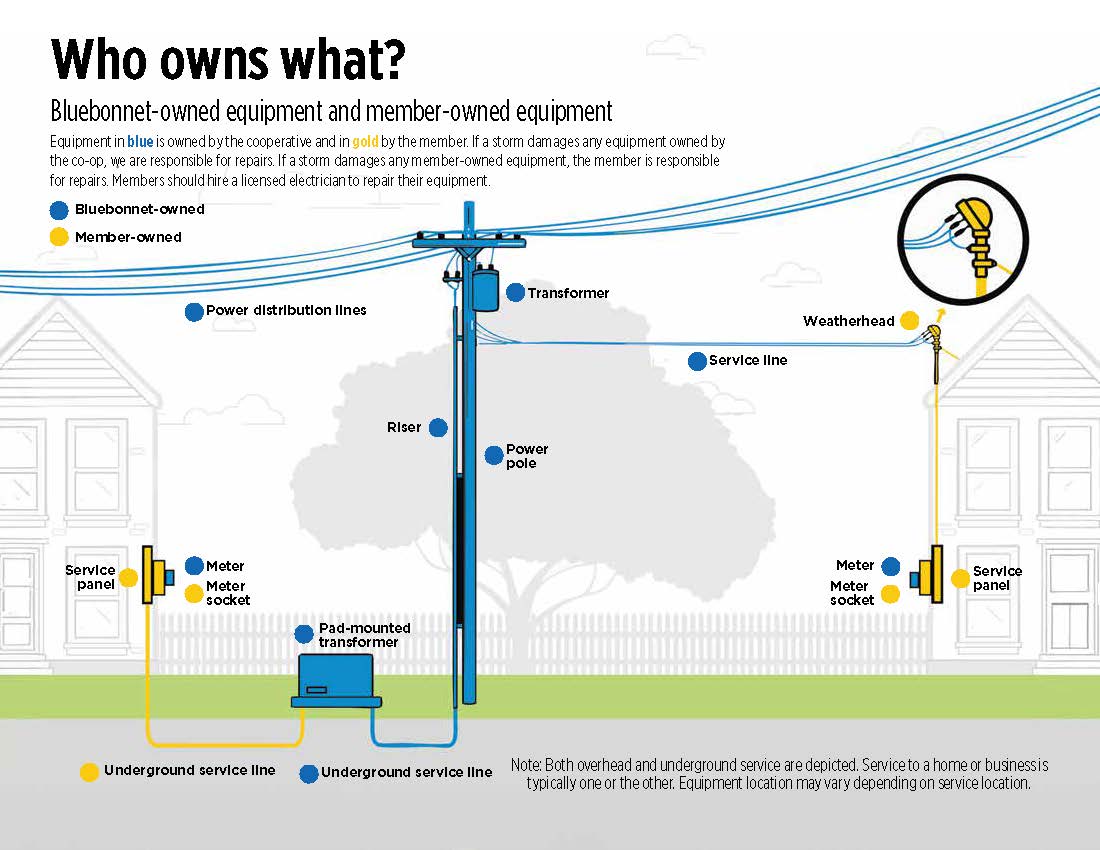
There may be times when a temporary disconnection of power to your meter is necessary for an electrician or contractor to work on wiring safely. To request a disconnection, please contact a member service representative at 800-842-7708 at least one business day in advance. We will disconnect the power to your property, temporarily pull your meter and reconnect when you're ready. A trip fee of $55 during business hours or $125 after business hours will be applied to your next billing statement.
If you notice dead or dying trees, branches growing too close to or over power lines, or a fallen tree on or near power lines, please fill out a tree trimming request online by logging in to MyBluebonnet, click on “Submit a request” and select “Tree Trimming.”
If the situation is an emergency or the tree is causing immediate danger or harm, or risk to life or property — call 911 immediately.
For urgent, but non-life-threatening issues, report the tree or limb by calling 800-949-4414 and leave a detailed message. Control center operators will listen and dispatch crews as quickly and safely as possible.
Bluebonnet crews prioritize and schedule work based on the severity of the situation and will inspect trees before safely removing them.
Log in to MyBluebonnet, click on “Submit a Request” and select “Tree Trimming.”
On the mobile app, log in and tap “More”, “Contact Us”, “Submit a Request” and select “Tree Trimming.”
If you don’t have a MyBluebonnet account, please use this online form »
For all other maintenance requests, please submit a request using the form at bluebonnet.coop/other-service-request».
Yes, blinking lights could indicate there is an issue on the power lines serving your home or business. Please report it as an outage so we can inspect the lines.
-
Text OUT to 44141
-
Visit bluebonnet.coop/outages
-
Use the MyBluebonnet app
-
Call 800-949-4414 to report via the automated outage line
If the issue is on the member’s side of the electric service — such as wiring problems inside the home or issues with privately owned equipment, including the meter loop or breaker box — a trip fee may be charged. In these cases, it’s best to contact a licensed electrician first to avoid unnecessary charges and ensure the issue is properly addressed. Always check your breakers before reporting an outage.
Use Bluebonnet’s online form to submit a request for new construction service for a residential property or a commercial property. To see what's required and what you'll need to prepare for your appointment, visit this page.
Yes, Bluebonnet will install a member-provided meter loop. The cost to install the meter loop is $125.
To schedule installation, call 800-842-7708 to speak with a member service representative from 8 a.m. to 5 p.m. Monday through Friday.
An easement is a legal agreement that gives Bluebonnet the right to access private property to install, operate and maintain electric lines and equipment. This ensures we can provide safe, reliable electricity to homes and businesses across our service area. Easements do not transfer ownership of land. They simply allow Bluebonnet to place infrastructure where needed to serve members and maintain system reliability.
A right-of-way is the physical area around electric lines that must remain clear for safety and maintenance. Bluebonnet maintains a 15-foot right-of-way on either side of our overhead power lines.
This space must remain free of trees, fences, structures or obstructions that could prevent access or create safety risks for crews.
No. Bluebonnet obtains easements solely for electric service. Other companies, including telecommunications and broadband providers, must secure their own easements directly with property owners. They are not allowed to use Bluebonnet’s easements.
Bluebonnet’s easements are typically 30 feet wide — 15 feet on each side of the power lines — and run the length of power lines. Trees should be planted at least as far from the easement as their expected mature height. For example, a tree that grows 40 feet tall should be planted at least 40 feet away from the edge of the easement, or about 55 feet from the power lines.
Trees, limbs and other vegetation too close to power lines can pose a threat to lineworkers and the public, and can also cause power outages when branches fall or come into contact with lines during storms or high winds, disrupting service or damaging equipment.
Yes, Bluebonnet’s contractors or employees will contact property owners before conducting planned inspections or maintenance work within easements on their property.
When power outages occur, it is not always possible for Bluebonnet to notify members before accessing their property. Bluebonnet crews may also access your property to inspect power lines and equipment for nearby outages if your power is on.
A door or gate hanger may be left in advance to notify you of upcoming planned work if property access is needed.
Bluebonnet regularly works with approved contractors to inspect, maintain, and upgrade our infrastructure. If a contractor is scheduled to work in your area, you will receive a text message or phone call in advance.
You can identify official Bluebonnet contractors by:
- A Bluebonnet contractor sticker on their vehicle
- Company identification badges
- Professional, marked vehicles and uniforms
- Visit bluebonnet.coop/scams to learn more about how to spot legitimate contractors and avoid scams.
If you ever have concerns about someone working near your property, contact Bluebonnet immediately at 800-842-7708.
If you’re ever unsure who owns a pole, line, or piece of equipment — contact Bluebonnet at 800-842-7708 from 8 a.m. to 5 p.m. Monday through Friday. A member service representative will help determine whether it belongs to us or another utility and guide you on next steps.
Yes, but only with Bluebonnet’s permission. Any company wishing to attach equipment — such as fiber or telecommunications lines — to Bluebonnet poles must:
- Submit a formal request to Bluebonnet by email engineering@bluebonnet.coop
- Allow Bluebonnet to conduct a structural evaluation of the pole to ensure it can safely support additional attachments
- Contact the property owner directly before performing any work
If approved, the company is responsible for maintaining its own equipment.
No. Bluebonnet members may not attach anything to a utility pole. This includes:
- Cameras
- Lights
- Satellite dishes
- Signs, decorations or flags
- Fencing, planters or other landscaping items
Unauthorized attachments are dangerous to utility workers and can cause equipment failures or unsafe conditions for lineworkers.
If you see any type of downed line — whether it’s a power line, cable TV line or telecom line — always treat it as potentially dangerous.
- Stay far away. Do not approach or touch the line or anything it may be in contact with (such as fences, trees or puddles).
- Call 911 immediately if there is any danger to life, property or traffic.
- Then call Bluebonnet at 800-949-4414 to report the issue.
- If you're not sure whether the downed line is an electric line or a communications line (like cable TV or internet), contact Bluebonnet first. We will assess the line and help identify whether the line is ours or belongs to another utility.
If the line belongs to a cable, broadband or telecom company and you're the property owner, you will need to contact that company directly to request repairs. Bluebonnet can help you determine which company is responsible if you're unsure.
Call a professional electrician if you notice any of the following warning signs: flickering or dim lights, sparks or buzzing sounds, burning smells, hot switch plates, loose plugs or damaged insulation. These issues could indicate serious electrical problems that require immediate attention.
If an appliance smells hot or is buzzing, use caution and don’t touch or unplug it directly. Turn off the power at the main circuit breaker first.
- Follow recommended wattage for appliances and light bulbs
- Keep space heaters away from flammable materials
- Plug major appliances (like fridges or AC units) into separate circuits
- Use GFCI outlets in damp areas
- Don’t leave cords hanging
- Pull the plug, not the cord
- Replace frayed or damaged cords
- Don’t use extension cords long-term
- Never run cords under rugs or flooring
- Don’t overload outlets or connect multiple power strips
- Use outlet covers around children
- Unplug small appliances when not in use
No. Check epa.gov for battery disposal guidelines.
- Don’t use electric tools in wet conditions
- Inspect tools before use
- Use cords rated for outdoor use
- Unplug tools when not in use
- Be cautious with metal ladders near power lines
- Stay away from downed lines — call 911 and Bluebonnet at 800-949-4414
Energy Savings Tips
- Get an energy audit to find savings opportunities.
- Seal gaps around windows, doors and siding with weather stripping and caulking.
- Have a licensed electrician inspect your home’s wiring every 10 years.
- Replace incandescent bulbs with energy-efficient LED bulbs.
- Keep kitchen and bathroom exhaust fan flaps closed when not in use.
- Upgrade to energy-efficient appliances and systems like heat pumps, water heaters and HVAC units.
- Choose metal or tile roofing with radiant barriers or light-colored shingles to reflect sunlight.
- Use light-colored exterior walls and limestone to reduce heat absorption.
- Add spray foam insulation in ceilings.
- Install double-pane windows for better insulation.
- Use solar screens or tinted windows to block heat and reduce cooling costs.
- Choose light-colored countertops and flooring to reflect more natural light and reduce the need for artificial lighting.
A home energy audit is a comprehensive inspection or assessment of a home’s energy efficiency. Energy audits will help identify opportunities to reduce your monthly energy bill, and you can do it yourself. To get started, you'll need your home's square footage, the type of foundation it’s built on, the current amount of attic floor or roof insulation and a copy of your last electric bill.
Make windows more efficient by sealing them with weather stripping and caulking, installing low-E windows, which can reduce heat loss by up to 50%, or replacing them with double-pane windows.
A smart thermostat is a wireless device that allows you to remotely control and schedule temperature settings via a smartphone, tablet or computer.
While programmable thermostats alone don’t make HVAC systems more efficient, they can significantly reduce electricity bills when properly programmed. When used with Bluebonnet’s free tools for members, such as the Usage Explorer and text/email alerts, smart thermostats can help you manage energy use more effectively.
Log in to MyBluebonnet for more details and account tools. After logging in, go to “Usage.” The Usage Explorer tool provides an easy-to-read look at your past and current electricity use. You can also use the Usage Comparison tool to view two billing periods side by side and the Average Usage tool to see your typical energy use over time.
To keep your HVAC system running efficiently, clean or replace air filters monthly and schedule an annual inspection to ensure smooth operation. Check for duct leaks by having an expert test your AC ducts, as leaks can waste cool air and allow hot, humid air inside.
Regularly clean the system with a garden hose to remove debris from the surrounding area. For better cooling efficiency, reposition insulation by moving it from above the ceiling to the roofline and using spray foam insulation, which helps keep the AC system in a cooler location during the summer.
To reduce electricity waste, unplug electronics when not in use. Many devices, including extra TVs, laptops, phones and chargers, continue to draw electricity even when turned off — a phenomenon known as “phantom load” or “vampire energy.” Use power strips to make it easier to disconnect multiple devices at once. Simply switch off the strip to stop power flow to electronics like TVs, computers and gaming systems.
For added efficiency, replace standard strips with advanced power strips, which automatically cut power to devices not in use.
Set up a charging station by plugging chargers into a power strip and turning it off when not in use. You can also use a light switch that controls your outlets for easy shutoff. Power down electronics when not needed — set your computer to sleep mode if you'll be away for more than 20 minutes and shut it down entirely if you're gone for more than two hours.
Turn off video game consoles instead of leaving them paused for long periods. Finally, keep heat-generating appliances like lamps and TVs away from your thermostat to prevent it from running your AC longer than necessary.
Use natural lighting whenever possible by opening blinds and window coverings to let in sunlight — especially when it’s not direct — to reduce the need for artificial light. Make it a habit to turn off lights when leaving a room to save electricty. Use timers and dimmers to lower light levels and reduce electricity use.
Place task lighting strategically, such as over kitchen islands or workspaces, and use table or floor lamps for reading instead of relying on overhead lighting. Avoid recessed light fixtures in high ceilings, which require more energy to illuminate effectively. Choose ENERGY STAR-qualified fixtures that meet energy efficiency standards, and switch to LED bulbs, which are more efficient and longer-lasting than traditional incandescent bulbs.
Summer heat makes your air conditioner work harder. Combined with longer daylight hours and higher humidity, this can significantly increase your electricity use.
The temperature comfortable for each induvial can vary. Aim for 75-78 degrees when you're home and active. Increase it to 80 degrees when away. Pair with ceiling fans for comfort — fans make you feel cooler without changing the actual air temperature.
You should turn off appliances completely rather than leaving them in standby mode to avoid "vampire energy." Vampire energy refers to the electricity used by electronic devices and appliances even when they appear to be turned off. Many devices continue to use electricity in standby mode, which can add up over time and increase your electricity bills. Fully turning off or unplugging appliances when not in use helps save electricity and reduces heat generated by electronics.
Yes, fans can help save money. They use much less electricity than air conditioners and help you feel cooler by circulating air and creating a breeze. This wind-chill effect helps your body cool down, so you can stay comfortable without lowering the thermostat as much. Using fans along with other cooling strategies can reduce your overall electricity use and lower your bills.
Yes. Electricity demand is usually lower during off-peak hours like evenings, which can reduce strain on the power grid. Additionally, cooler evening temperatures can help reduce the heat added to your home by appliances like washers and dryers.
Yes, we offer payment plans to help members manage their bills. You can request a payment extension » online through your MyBluebonnet account, the mobile app or by calling member services. We also offer the SteadyPay » program, which lets you pay a consistent monthly amount based on your average usage to help with budgeting. For more information or to enroll, contact member services from 8 a.m. to 5 p.m. at 800-842-7708.
Depending on your income and household size, you may qualify for assistance programs such as LIHEAP (Low-Income Home Energy Assistance Program), the Weatherization Assistance Program, or help from local nonprofits that offer utility aid. These programs can help lower your electricity bills and improve your home’s efficiency. Learn more about payment assistance »
SteadyPay is a billing option for members to pay a consistent amount on their bill over a period of time. The amount is calculated by a member’s average electricity use over the last 12 months and allows the member to pay the same amount for six months. Twice a year — in April and October — bill amounts are recalculated based on the member’s last 12 months of electricity use and the new amount will be reflected on May and November billing statements, respectively. Learn more about SteadyPay »
If you miss a payment, your account is considered delinquent 16 days after the bill is issued. A late payment fee of $5 or 5% of the bill, whichever is greater, will be applied. We will send a delinquency notice giving you 10 days to pay the past due balance to avoid service interruption. If your service is disconnected, you must pay the full past due amount, a service interruption fee and any applicable deposit before your service can be restored.
To prevent disconnection, it’s important to pay the past due amount promptly. If you cannot pay on time, please contact member services at 800-842-7708 to discuss payment options.
Extreme heat is typically defined as prolonged periods of high temperatures, often combined with high humidity, that pose health risks to people and animals. While the exact threshold can vary by region, the National Weather Service (NWS) in the U.S. generally considers extreme heat to occur when:
- Temperatures reach 90 degrees or higher for multiple days
- The heat index — a measure of how hot it feels with humidity — rises to 100 degrees or more
In Texas and other hot climates, extreme heat can be especially dangerous for those working outdoors, like lineworkers, farmers or construction crews, because their bodies have less chance to cool down. Hydration, shade and rest become essential for safety during these conditions.
Heat-related illnesses, such as heat exhaustion or heat stroke, occur when the body can’t cool itself effectively. Normally, the body cools through sweating, but during extreme heat, that may not be enough. When the body temperature rises faster than it can cool down, it can lead to serious health issues — including damage to the brain and other vital organs. Learn more about heat-related illness »
Symptoms of heat-related illness can vary depending on severity. Common signs to watch for include:
- Early signs (heat exhaustion): heavy sweating, muscle cramps, fatigue or weakness, dizziness or fainting, headache, nausea or vomiting, cool, pale or clammy skin, rapid heartbeat
- Severe signs (heat stroke — a medical emergency): high body temperature (103 degrees or higher), hot, red, dry or damp skin, confusion or slurred speech, seizures, loss of consciousness
If someone shows signs of heat stroke, call 911 immediately. While waiting for help, try to cool them down by moving them to shade, applying water or using a cold compress.
There are budget friendly ways to beat the heat while keeping electricity use down:
- Use fans efficiently – ceiling fans use much less electricity than AC units.
- Set ceiling fans to spin counterclockwise in summer to cool areas you're in.
- Block the sun – close blinds or curtains during the day, especially on windows facing east and west.
- Using thermal or blackout curtains can make a big difference in the temperature of rooms that receive direct sunlight.
- Cool yourself by staying hydrated with cold water or electrolyte drinks.
- Apply a cold, damp towel to your neck, wrists or behind your knees.
- Take short, cool showers to quickly lower your body temperature.
- Avoid indoor heat sources and skip the oven. Try grilling outside, use a microwave or slow cooker instead.
- Unplug unused electronics, which can give off heat even in standby mode.
Those most at risk during extreme heat include older adults, especially those over 65, young children and infants and people with chronic health conditions such as heart, lung or kidney disease. Individuals taking certain medications that affect hydration or body temperature regulation are also more vulnerable. Outdoor workers like farmers, construction workers and lineworkers face higher risks, as do people without access to air conditioning or adequate cooling.
- Stay hydrated by drinking plenty of water or electrolyte drinks, especially when outdoors or active.
- Wear lightweight, loose-fitting and light-colored clothing to help your body stay cool.
- Limit outdoor activities during the hottest parts of the day, usually between 10 a.m. and 4 p.m., and take frequent breaks in the shade or in air-conditioned spaces.
- Use fans or cooling towels to help lower your body temperature, and never leave children, pets or vulnerable individuals in parked cars.
- Pay attention to your body — if you start feeling dizzy, weak or excessively sweaty, take immediate steps to cool down and rest.
- Make sure pets have access to plenty of fresh, cool water at all times
- Keep them in shaded or air-conditioned areas during the hottest parts of the day
- Avoid exercising your pets during peak heat hours and opt for early mornings or evenings when it’s cooler
- Never leave pets in parked cars, even for a short time, as temperatures inside can rise rapidly
- Watch for signs of heat stress, such as excessive panting, drooling, weakness or confusion, and contact a veterinarian immediately if you notice any symptoms
- When spending time outdoors, wear clothing that blocks out light, including long-sleeved shirts and pants.
- Use sunscreen with a SPF of at least 15.
- Wear a hat to protect your neck and ears and limit sun exposure.
- UV rays are most intense and dangerous between 10 a.m. and 4 p.m.
- Drink plenty of water to stay hydrated.
- Wear lightweight, loose-fitting and light-colored clothes.
- Spend time in air-conditioned places when you can.
- Use fans to help circulate air.
- Take cool showers or baths to lower your body temperature.
- Avoid outdoor activities during the hottest hours, usually 10 a.m. to 4 p.m. and rest in the shade when outside.
- Applying a damp cloth or cooling towel to your neck, wrists or forehead can also help you stay cool.
Log in » to your MyBluebonnet account and select "Settings" then "Manage Notifications". From there you can choose your usage alerts preferences. You can also download our mobile app for on-the-go tracking. Go to your MyBluebonnet account and select "Settings" then "Manage Notifications". From there you can choose your usage alerts preferences. You can also download our mobile app for on-the-go usage tracking.
Use the Usage Explorer and Comparison » tools in your online account or MyBluebonnet app » to monitor patterns and make informed changes.
Yes. A member service representative can walk you through your electricity usage data and recommend personalized tips. Call 800-842-7708 from 8 a.m. to 5 p.m. Monday through Friday.
A Conservation Alert is a request from ERCOT asking Texans to voluntarily reduce their electricity use to avoid overloading the grid. This usually happens during extreme heat or unexpected outages at power plants.
During a conservation alert, here are ways to help reduce electricity demand by
- Turn off or unplug nonessential appliances and electronics.
- Lower your thermostat a few degrees in summer or raise it in winter to use less heating or cooling.
- Avoid using large appliances like washers, dryers and ovens during peak hours.
- Use fans instead of air conditioning when possible, and turn off lights in unoccupied rooms.
Conserving electricity during these alerts helps prevent power outages and supports the stability of the electric grid.
You can stay informed about ERCOT updates by signing up for the Texas Advisory and Notification System » (TXANS) to receive email alerts about grid conditions, including Weather Watches and Conservation Notices. Download the ERCOT mobile app for real-time updates. Follow ERCOT on social media platforms like X, Facebook, Instagram and LinkedIn for timely information. You can also subscribe to ERCOT’s Emergency Alerts to get notifications during critical grid conditions.
Schedule a heating inspection before cold weather arrives to ensure your system runs efficiently and helps reduce winter energy bills. Replace air filters regularly to maintain performance, and seal drafts around windows, doors, and wall openings — including areas where cables or wires enter your home — using caulk or weather stripping. Keep doors and windows closed to retain warmth, and use insulated curtains to keep warm air in and cold air out.
Remove holiday lights when the season ends to avoid unnecessary energy use. Turn down your thermostat a few degrees while home and if possible, more when away — lowering it by just one degree can save around 3% on your energy bill. Open shades on south-facing windows during the day to take advantage of natural sunlight and close them at night to retain heat. Adjust ceiling fans to rotate clockwise to push warm air downward and use space heaters wisely to warm only the rooms in use.
Limit the use of exhaust fans, as they can pull heated air out of your home. Avoid running large appliances during peak morning and evening hours to save energy. Consider using slow cookers over ovens — they use less energy and don’t lose heat when opened. Improve fireplace efficiency by closing the flue and damper when not in use, using tempered glass doors or inserts, upgrading to a more efficient model or sealing it off entirely. Artificial logs can also reduce emissions and conserve energy.
What can I do outdoors to save in the winter?
Clean your windows and open drapes to let sunlight naturally warm your home during the day. Sweep your chimney by hiring a professional to ensure it’s clean, safe and ready for use during colder months.
Switch to LED holiday lights — they’re more energy efficient, longer lasting and safer than incandescent lights. Be sure to take down both indoor and outdoor holiday lights once the season ends to avoid unnecessary energy use.
Keep leaves and debris away from HVAC units to maintain efficiency and airflow. Avoid using emergency or auxiliary heat modes unless absolutely necessary, as they consume significantly more energy.
There are several tax credits and financial assistance options available to help offset the cost of energy-efficient appliances, weatherization and home improvements. Helpful resources include the Federal Energy Star website, the Texas State Energy Conservation Office, IRS Home Energy Efficiency Credits, Energy.gov and the Texas Weatherization Assistance Program.
Low-income Bluebonnet Electric Cooperative members may qualify for a home assessment and energy-saving improvements through the Texas Weatherization Assistance Program, which is administered by the Texas Department of Housing and Community Affairs. For more information or to apply, contact the agency directly at 888-606-8889.
Solar & Renewables
Bluebonnet doesn't install renewable energy resources such as solar arrays or batteries. We offer resources and information for you to get started on your solar journey. See the process to connect solar »
Bluebonnet members can choose any solar vendor they'd like to use for their renewable energy installations. Because there are many in our service area, with new vendors moving in often, we will not recommend specific vendors. The best way to find a reputable vendor is to read reviews and talk with friends and neighbors who have solar energy systems.
Bluebonnet does not provide a production meter. Bluebonnet uses a dual-register meter that will track returned electricity received from the solar and electricity delivered from Bluebonnet to the home. Members can track this data using their MyBluebonnet account or mobile app.
If you are a new or existing member taking over a location with solar, you will need to complete a solar application. Reach out to a member service representative at 800-842-7708 from 8 a.m. to 5 p.m. Monday through Friday or send an email to renewables@bluebonnet.coop with your solar questions.
Members do not need to be present for solar inspections, though they are welcome to be there if they prefer.
Bluebonnet's bill only shows the excess electricity sent back to the grid. Your solar system powers your home first, so the bill doesn't reflect the total amount of electricity generated— only the additional, unused electricity that is sent back for credit.
While solar power systems are an effective way to lower your electric bill, most members still receive a reduced bill. On average, members with solar see about a 30% decrease, though savings can range from 30% to 70%. The actual reduction depends on the size of the system, the home's energy efficiency and the member’s electricity use habits. Daily consumption and the capacity of the solar array are key factors in determining savings.
Reach out to your solar vendor for guidance on how to monitor your system's generation.
Solar panels don’t store power directly. Instead, the electricity they generate during the day is either stored in a battery (if you have one) or sent back to the grid.
Your total solar energy sent back to the grid will be listed as “Member Generation” on your monthly bill. Additionally, you can track your electricity return by logging into your MyBluebonnet account and visiting the Usage Explorer. There, you'll be able to view both your return and consumption from Bluebonnet.
You can reach out to your local tax office to ask about any available incentives, rebates or grants for solar installation in your area.
Unless a renewable energy system has battery backup storage, the home will lose power during an outage. Grid-tied only systems require power from the grid to work and go out when a line is down for the safety of lineworkers.
Members should contact their solar vendor for repairs or find an electrician experienced with solar systems.
Any excess power you generate that exceeds your usage can be returned to the electric grid, and you'll receive a credit for that surplus on your monthly bill. Your Bluebonnet electric bill consists of two main charges: the Wholesale Power Cost and the Bluebonnet Residential Service fee, which covers the service availability fee. If you live in a city served by Bluebonnet, an additional city franchise fee may also appear on your bill. The total amount for a billing period is calculated by adding the wholesale power cost, residential service fee and service availability fee, then subtracting the member production credit for any excess power generated.
Bluebonnet does not install, own or maintain EV charging stations within its service area. However, if you're considering installing a home charger, your first step is to contact a certified electrician to ensure proper installation and safety.
Learn about electric vehicles from these articles:
Take smart steps to charge your electric vehicle at home »
Builders & Developers
Timelines vary depending on the size and complexity of the project. For general guidance, please refer to the Commercial Development Packet. If you’re working with a large project coordinator, ask for specific timelines related to your project.
Before construction on your project can begin, all developers must have a Bluebonnet account. If you do not have an account, call member services at 800-842-7708 from 8 a.m. to 5 p.m. Monday through Friday. Please be ready to provide the following information for the account set-up: Business name, mailing address, phone number, primary contact’s name, phone number and email for business account, copy of W-9 and member agreement.
- Residential start service form
- Development Information Request Form
- Computer-aided design (CAD) file of development/site plan
- Preliminary/Final Plat
- Expected construction timeline
- If applicable, an activation fee and/or deposit may be required
- For more information, refer to Bluebonnet’s Residential Development Packet
- Commercial start service form
- Computer-aided design (CAD) file of development/site plan
- Commercial load sheet for each service requested
- Expected construction timeline
- If applicable, an activation fee and/or deposit may be required
- For more information, refer to Bluebonnet’s Commercial Development Packet
Yes, Bluebonnet has detailed specifications for both residential and commercial developments. These specifications are outlined in the development packets, which explain the responsibilities of the members and Bluebonnet. Because every project is unique, not all specifications may apply. A Bluebonnet coordinator will work with you to determine which requirements are relevant to your specific development.
A 30-foot easement is required for the construction and maintenance of overhead primary power lines. For underground primary lines, a 20-foot easement is needed.
Project costs vary based on size, scope and site conditions. Once all required information is submitted and reviewed, your assigned Bluebonnet large project coordinator will provide a customized cost estimate. Early coordination helps ensure accurate planning and budgeting.
Bluebonnet serves all or parts of 14 Central Texas counties. To determine if your location falls within the service area, use the service area map.
Majority of the work completed on large projects must be completed by Bluebonnet or its contractor crews. However, developers can install the primary conduit and three-phase transformer pads required for the project. The specifications for these can be found in the Commercial Development Packet.
Bluebonnet is responsible for maintaining the electric meter, transformer (if owned by Bluebonnet), utility poles and power lines up to the point of service. As the property owner or developer, you are responsible for all equipment beyond that point, including the meter base, conduit, wiring into the building and any on-site infrastructure such as private transformers or underground service.
You’re also responsible for any trenching, easements or permits required on your property. For commercial or industrial projects, we recommend coordinating with Bluebonnet early to confirm the point of service.
Community Connection
Bluebonnet partners with the Lower Colorado River Authority (LCRA) through its Community Development Partnership Program, which helps volunteer fire departments, local governments, emergency responders and nonprofit organizations fund eligible capital improvement projects in LCRA’s wholesale electric, water and transmission service areas. Bluebonnet is one of LCRA’s wholesale electric customers and is a partner in the grant program.
Visit lcra.org/cdpp to access the application and guidelines. You may also contact your community representative for help.
Yes, Bluebonnet community representatives are available to assist with the application process.
Contact a community representative to request fans. They will help determine size and availability. Reservations should be made at least a month in advance.
Bluebonnet donates to 501(c)(3) nonprofit organizations located within the 14 counties in its service area.
Projects include emergency equipment, energy-efficient upgrades, accessibility improvements and improvements to fire stations, parks, libraries, museums and other community facilities.
Bluebonnet supports its communities through sponsorships, donations, volunteerism and by providing cooling fans and bottled water. This assistance goes to local nonprofit organizations to help strengthen and enrich the service area.
Organizations must wait 24 months after receiving funds and must complete the previous project before reapplying.
Yes, access to electricity within 25 feet is required to power fans at your event. Access to a water faucet nearby is also helpful.
Yes, first-time partners must submit a W-9 form to their community representative.
Grants are awarded twice per year. Applications are due by midnight on January 31 and July 31. The review process takes up to eight weeks. Applicants will be notified by representatives from the Lower Colorado River Authority on their application status.
High school juniors or seniors who live in the Bluebonnet service area with a parent or guardian who is a full-time resident and has an active Bluebonnet account.
Selection is based on the quality of a student’s academic record, community service, leadership, extracurricular activities, awards and a video application.
January 16, 2026.
Contact Barbara Turner at 512-940-5885 or via email at barbara.turner@bluebonnet.coop.
Bluebonnet offers two types of Scholarships of Excellence:
- Academic Scholarship for students pursuing a bachelor’s degree
- Trade & Technical Scholarship for students pursuing certification in a trade or technical field
For each category of scholarship, selected students receive $2,500.
Yes, graduating seniors whose parent or guardian lives in the Bluebonnet service area are eligible to apply for both programs. Applying for one does not reduce your chances of being selected for the other.
High school seniors who live in the Bluebonnet service area with a parent or guardian who is a full-time resident and has an active Bluebonnet account.
Selection is based on the quality of a student’s academic record, community service, work experience, leadership, extracurricular activities, awards and a written essay. Applicants are judged on a bling grading system and notified by email on their application status.
Scholarships are funded through Bluebonnet’s Annual Scholarship Golf Tournament and unclaimed capital credits returned by the State of Texas — not from members’ electric bills.
The deadline for the 2026 Scholarships of Excellence is March 6.
Contact Sherry Murphy at 979-966-8062 or via email sherry.murphy@bluebonnet.coop
Will Holford, Bluebonnet’s manager of public affairs
512-332-7955
will.holford@bluebonnet.coop
Alyssa Meinke, Bluebonnet's manager of marketing & communications
512-332-7918
alyssa.meinke@bluebonnet.coop
Texas Co-op Power magazine is a statewide publication mailed free every month to all Bluebonnet members. It includes special Bluebonnet-specific content in a blue-bordered section. Read the magazine online »
Yes, the digital magazine is a convenient way for members to stay connected with Bluebonnet and receive the monthly Texas Co-op Power magazine by email. It helps save paper and reduces waste.
Members who prefer not to receive a printed copy can opt out and switch to a digital-only version. Log in to your MyBluebonnet account at bluebonnet.coop, click “Submit a Request” or “Contact Us,” then select “Submit a Request.” Choose “Enroll in Digital Magazine” from the drop-down menu.
Please allow up to two months to begin receiving the digital version.
For advertising opportunities in the statewide magazine, contact Elaine Sproull at 512-486-6251or advertising@texascooppower.com.
Membership
You can download a PDF of the Member Handbook using the links below:
You can download a sample copy of the Member Agreement using the links below: Member agreement, English », Member agreement, Spanish »
As a member of an electric cooperative, you're not just a member — you're a co-op owner. Our members have a say in how the co-op is governed, receive a share of annual profits and belong to an organization that is deeply involved in the community.
Bluebonnet Electric Cooperative is a nonprofit, member-owned business. Unlike private, for-profit businesses that pay dividends to their shareholders, Bluebonnet shares its excess revenue — money it collects above what it takes to run the business on an annual basis — with its members in the form of an allocation of capital credits. Capital credits may be retired at the discretion of Bluebonnet’s Board of Directors when the cooperative has met certain financial requirements and other obligations.
Yes. If you purchase electricity from the co-op, you are a member and automatically earn capital credits based on how much electricity you use.
An allocation is your share of the margins. Bluebonnet sets this money aside to use as operating capital for improvements and maintenance. A retirement is the amount you receive in a check or as a credit on your bill. It is a percentage of your allocation accumulated over the years.
Each year, the co-op calculates how much electricity you purchased and how much revenue was left after covering expenses. Your portion of the margins is allocated to you based on your electricity use.
Because it is important for the economic strength of the cooperative to retain a portion of the money its members pay in order to invest back into the cooperative, Bluebonnet members cannot cash out their capital credits. In general, Bluebonnet members can expect their capital credit balance to be paid out over a 30-year period, because that is the useful life of most capital assets funded by our members’ patronage.
Bluebonnet’s Board of Directors voted to provide early retirement of capital credits as a service to former members who are owed less than a certain amount in order to help facilitate the closing of those inactive accounts. Bluebonnet has also approved providing early retirement of capital credits as a service to the estates of deceased members so that their executors can distribute the funds and close out the estates in a timely manner.
Yes. If you move out of Bluebonnet's service area, your capital credits are still yours. Be sure to keep your address updated so we can reach you when it’s time to retire your credits. Call 800-842-7708 to update your address with a member service representative from 8 a.m. to 5 p.m. Monday through Friday.
Sometimes members move away or forget to update their mailing address. When this happens, we may have capital credits waiting to be claimed. Individuals with an unclaimed property request are advised to visit the Texas' Unclaimed Property website
Bluebonnet members can register from 1:30 p.m. to 2:30 p.m. at the Annual Meeting, held at The Silos on 77, 1031 County Road 223, Giddings. Upon arrival, Bluebonnet member service representatives will assist you with registration and enter you into a drawing for a door prize. To register, your name must appear on your Bluebonnet account. You can verify or add your name by calling a member service representative at 800-842-7708 from 8 a.m. to 5 p.m. Monday through Friday.
Three seats on Bluebonnet’s Board of Directors are up for election this year. There is one candidate for the District 3 seat, Bastrop County: Roderick Emanuel (incumbent). There is one candidate for the District 4 seat, Lee, Milam and Williamson counties: Russell Jurk (incumbent). There is one candidate for the District 6 seat, Austin, Colorado and Fayette counties: Byron Balke (incumbent).
The Proxy Committee is composed of all Bluebonnet Board members whose terms are not currently up for election. This year’s Proxy Committee members are Ben Flencher, Robert Mikeska, Milton Shaw, Shana Whiteley, Debbi Goertz and Bryan Bracewell.
Completed proxy forms must be dropped off at any of Bluebonnet’s five member service centers in Bastrop, Brenham, Giddings, Lockhart or Manor, or postmarked by the deadline and mailed to:
Bluebonnet Electric Cooperative
c/o Survey and Ballot Systems
P.O. Box 46430
Eden Prairie, MN 55344-9751
If you need another proxy form, pick one up at any of the member service centers.
No, the proxy is valid only for the meeting specified on the proxy form.
Member service representatives will be available to help members with their cooperative business and answer any questions members may have.
Survey & Ballot Systems is a third-party, independent vendor that specializes in administering corporate elections nationwide. It has the experience to efficiently and accurately tally proxies and votes while protecting members’ confidential account information.
Call a member service representative at 800-842-7708 between 8 a.m. and 5 p.m. Monday through Friday, or email annualmeeting@bluebonnet.coop.
Bluebonnet Electric Cooperative is one of the largest electric cooperatives in Texas and has been serving its members since 1939. Bluebonnet serves more than 142,000 meters and owns and maintains more than 13,000 miles of power lines. Located across more than 3,800 square miles within 14 Central Texas counties, the service area stretches from Travis County to Washington County, and from Milam County to Gonzales County.
In the 1930s, big cities in Texas had already enjoyed the benefits of electricity for several decades. The rural towns, however, were still in the dark. In 1939, all that changed when the electric cooperative that would become Bluebonnet brought power to the farms, ranches and communities across Central Texas. Read more about Bluebonnet’s history and timeline.
Bluebonnet serves a large portion of Central Texas. To see if we provide power to a specific location, please use our interactive service area map. Simply enter the address, and the map will show whether your home or business is within our service area.
Bluebonnet is a cooperative. When you belong to an electric cooperative, you’re not just a customer — you’re a member and a co-op owner. Our members choose who governs the co-op, receive a share of annual profits and belong to an organization that’s deeply connected to their community.
A nine-member Board of Directors leads the cooperative. Our Board members, who are also cooperative members, are elected for three-year rotating terms. Bluebonnet's service area is divided into seven districts, with no limitations on the number of directors from any one county (Article III, Section 1 of the Bylaws). Each district is represented by one director, except for District 3 (Bastrop County), which is represented by three directors.
Speak to a member service representative by calling 800-842-7708 between 8 a.m. and 5 p.m. Monday through Friday, or emailing memberservices@bluebonnet.coop.
Click for 2026 Scheduled office closings » Spanish »
Bluebonnet crews are ready to respond to outages 24/7/365. Please, call 800-949-4414, text OUT to 44141, visit bluebonnet.coop or use our MyBluebonnet mobile app to report an outage. Call 800-842-7708, visit bluebonnet.coop or use our MyBluebonnet mobile app to pay your bill 24/7.
Bluebonnet Electric Cooperative is one of the largest electric cooperatives in Texas and has been serving its members since 1939. Bluebonnet serves more than 142,000 meters and owns and maintains more than 13,000 miles of power lines. Located across more than 3,800 square miles within 14 Central Texas counties, the service area stretches from Travis County to Washington County, and from Milam County to Gonzales County.
Contact Bluebonnet's human resources at hr@bluebonnet.coop with your application question.
Explore current job openings and learn more about working with Bluebonnet at bluebonnet.coop/careers.
You will receive an email or be contacted directly with the next steps to schedule an interview if selected.
Bluebonnet’s apprentice program requires both technical instruction and on-the-job learning. The program generally takes four years, though previous experience and education can speed things along. Some apprentices start right out of high school, while others have had years of experience in utility linework or other fields.
On-the-job training focuses primarily on building overhead power lines, though apprentices also learn about underground lines and transmission of power at substations. One of the most technical tasks an apprentice must learn in the field is the proper way to connect meters, including large commercial meters.
The final step in becoming a Bluebonnet journeyman lineworker is demonstrating the capability of troubleshooting an outage and making the needed repairs.
We have year-round recruiting for our apprentice program and open up for applications the first Tuesday of each month. By submitting your application, you'll be placed into the application pool. Once Bluebonnet has an open position to fill, we'll review that application pool of candidates. More details can be found at bluebonnet.coop/careers.
Bluebonnet Electric Cooperative’s lineworker intern program recruits and trains the next generation of lineworkers. Interns begin with six months of classroom instruction and field observation focused on safety, earning climbing certifications, technical training and commercial driver’s licenses. They then move into apprentice roles, training alongside journeyman lineworkers.
Applications for the lineworker intern program are typically available in late spring. Candidates should check bluebonnet.coop and Bluebonnet’s social media for updates on applications. You can search for open apprentice roles on the careers page at bluebonnet.coop/careers.
Applications for internship opportunities for high school and college students open in late spring. Check out Bluebonnet career opportunities or watch our social media pages for application details and deadlines.
You will receive an automated response via email when your application is received.